
Last Updated on April 30, 2026 by Mr.Feng
This article is part of Experiment #001. Iteration 1 failed because my account got suspended. The core problem was compliance. This article documents the 10 rules I developed to keep a Google Ads account alive and get affiliate landing pages approved, including what a “bridge page” actually means and why most definitions online are wrong.
Deep Dive: Explore the complete documentation of my experiment logic and methodology here.
Live Tracking: Follow my real-time data updates and live screenshots on BlackHatWorld.
Quick Updates: Catch my latest daily progress and tactical insights on X (Twitter).
I feel digital marketing is kind of a mysterious art. The conclusions I’m validating right now don’t mean copying them will necessarily work for you, and timing can also affect the results. Everything here is for reference only. I’ll keep running experiments and updating along the way.
Background
After my first experiment failed I came to a conclusion. In 2026 running a long-term profitable Google search ad campaign is no longer as simple as it used to be.
The first thing I’m thinking about now isn’t conversion rates but Google Ads compliance. Especially for someone doing affiliate marketing like me it’s even harder. Everyone says Google doesn’t like affiliate but I’m not buying that.
When I create a landing page for Google Ads, especially for affiliate offers, I focus on content value, transparency, and compliance.
I’ve searched online for compliance information. Most of it is vague and unclear, more like scams than tutorials. The people writing it haven’t really tested anything and it’s just a patchwork. Even Google’s own documentation is confusing, feels like a manual from Mars. At least for a regular person like me it’s impossible to make sense of it.
One term kept coming up in my research: “bridge page.” Everyone seemed to have an opinion on it, but nobody could give me a straight answer on what it actually means or how Google defines it. That became one of the things I wanted to figure out through this experiment.
My 4 Core Hypotheses for Google Ads Compliance Experiments
When it comes to Google Ads compliance, I don’t have a standard answer. I can only test and validate my own assumptions through experiments. I created a new personal Google Ads account based on my original Gmail account, but kept the same payment information from my previously banned account. I didn’t change any of that. I mentioned all these details in my second iteration experiment article. You can check out that post to see the full experiment process.
Based on scattered information online and my own AI research, I’ve come up with four core compliance hypotheses:
- A new account needs to let Google get to know it slowly, to recognize and accept it, kind of like nurturing a social media account.
- I can’t expect to make money from Google Ads before Google has accepted me.
- Don’t try to deceive Google. Be honest about your business model.
- Follow the law, be transparent about your information, and just be real.
What Is a Bridge Page and Why Google Ads Rejects It
Before I started this experiment, I kept seeing the term “bridge page” come up whenever I researched Google Ads affiliate compliance. But most explanations online were vague and unhelpful. So I want to break it down the way I actually understand it, based on my own research and testing.
Google’s Official Definition of Bridge Page
To be honest, I couldn’t find any official definition of “bridge page” in Google’s documentation. A lot of people in the affiliate marketing space use this term, but the word Google actually uses is “doorway pages“.
According to Google’s official guidelines, doorway pages are pages created specifically to rank in search results, but provide little to no value to users and ultimately just redirect them somewhere else.
In the context of Google Ads, my interpretation is similar, if your page exists solely to send users to an affiliate offer without providing any independent value, it will likely cross Google’s line.
“Bridge page” is more of an industry slang term that gets thrown around in affiliate marketing circles. You won’t find it anywhere in Google’s official documentation. I think it’s worth clarifying this, because I was confused by it myself when I first started researching.
What a Thin Affiliate Page Looks Like
“Thin affiliate” is a related concept that I also ran into a lot during my research. From what I’ve gathered, a thin affiliate page usually has one or more of these characteristics:
- Very little original content, mostly just product images and a CTA button
- No educational value, no FAQ, no comparison, no context
- The page feels like it was built in an hour just to pass traffic through
- Heavy reliance on the merchant’s content, basically just a copy of the product page
- No real disclosure of the affiliate relationship
Bridge Page vs. Compliant Landing Page
Based on my own testing, here’s how I see the difference between a bridge page and a landing page that actually gets approved
| Dimension | Bridge Page ❌ | Compliant Landing Page ✅ |
|---|---|---|
| Content Volume | Minimal, a few images, slogans, and a CTA button | 500+ words with a complete structure |
| Content Value | No independent value, exists only to drive traffic | Educational content, FAQ, product comparisons |
| CTA Link | Links directly to the affiliate offer | Links to an intermediary page under the same domain, then redirects |
| Final URL | Tracker links or shortened URLs | Landing page domain directly, no redirects |
| Transparency | No affiliate disclosure | Clear disclosure placed prominently at the bottom |
| Legal Pages | Missing or absent | Includes Privacy Policy, Terms of Service, and About Us |
| Contact Info | Fake or missing | Real domain based email, real address and phone number |
| Originality | Looks like every other affiliate page | Original content with a personal experiment perspective |
| Mobile Optimization | Not optimized | Tested across devices, PageSpeed rated “Good” |
| Google Review Result | Rejected | Approved in under 30 minutes ✅ |
The last row is the one I can speak to from personal experience. When I finally built a page that checked all the boxes on the right column, my ad was approved in less than 30 minutes. That’s not a guarantee it will work the same way for you, but it was a clear signal to me that the approach was fundamentally different from what I had been doing before.
The honest takeaway here is this, the line between a bridge page and a compliant landing page isn’t really about design. It’s about whether your page has genuine value for the user, independent of the affiliate link.
My Google Ads Compliance Checklist (Experiment Version)
Based on the four compliance hypotheses I laid out earlier, and what I now understood about bridge pages and thin affiliate pages, I built my landing page and set up my campaigns strictly around these principles.
That said, this checklist reflects what I did to keep my experiment running smoothly, I can’t tell you which of these factors actually made the difference during the review process.
But at least for the current experiment period, all of the settings and principles listed below were implemented. The account has stayed stable, with no bans or major compliance issues.
1.Don’t Promote Products That Google Ads Explicitly Bans
Out of all the compliance rules, this one is the clearest. I absolutely cannot violate it. It’s a definite risk, not a probabilistic one.
Google’s official policies provide a clear definition of prohibited content. If a product falls into that red line category, then no amount of optimization afterward will matter.
For this experiment, I chose to promote a mainstream consumer product: titanium cutting board. This was the highest-scoring offer according to an affiliate scoring tool I designed myself. It doesn’t fall into any sensitive or prohibited categories.

Confirming this was one of the first things I did before starting the experiment.
2.Make Sure Your Ad Account Isn’t High Risk or Blacklisted
My Bing Ads account, was permanently flagged for violations for some unknown reason. Any new registration immediately triggered a ban. Google has similar policies. Accounts like this simply cannot be used to register new ads normally.
In my new experiment, the situation is different. Although a previous account using the same identity information was stopped because its business model wasn’t accepted, I was still able to create a new Google Ads account under my original Gmail. As long as I follow compliance principles and keep the risk low, the account works fine.
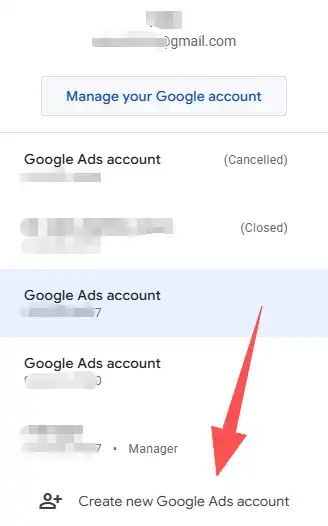
I’ve seen people online say that if your account gets banned, you can’t use the same payment information or IP to register a new account. This experiment finally helped me test this. It turns out it depends on the specific situation. There are different levels of severity when an account is banned. It’s not true that every banned ad automatically prevents a new account under the same Gmail from working.
3.Make Your Page Content Rich Enough to Avoid Being Flagged as Thin Affiliate
Google is very strict when reviewing landing pages for Google Ads, especially under the Google Ads affiliate marketing policy 2026. This became especially clear when I was testing whether a single-page landing page could pass approval.
From my experience, pages with thin content or no added value, such as a single image, a few slogans, and a CTA button, are often rejected outright. If the main purpose is only to drive traffic to an affiliate link without providing substantial content, it is easy to cross Google’s red line.

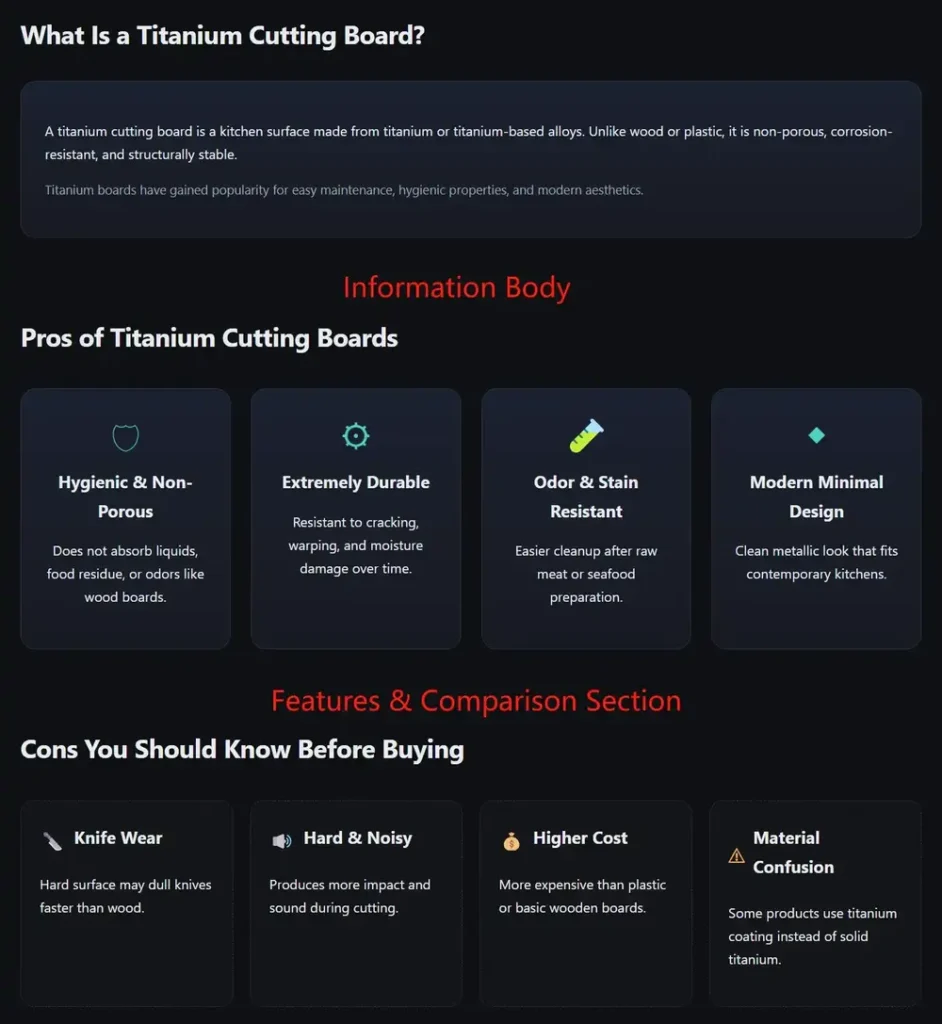
I don’t really know how to quantify whether a page has enough value, but when creating my own affiliate landing page for Google Ads, I followed two main principles. First, the page should have at least 500 words, with a complete structure including an introduction, FAQ section, comparison information, and educational content, not just sales copy. Second, the page should feel full and well-organized, with as many sections as possible. I start by designing the structure around core keywords, then add relevant content to make the page logic complete and compliant with Google Ads policies.
4.Keep Your Copy Neutral and Authentic
In my previous experiment, my account was banned because the business model wasn’t accepted. Based on my research, I believe that directly showing prices, discounts, medical claims, absolute guarantees, or exaggerated claims like “the best” or “100% effective” can easily trigger Google’s misrepresentation review.
For my new account, to help it get through the high-risk period smoothly, my strategy was to use lightly commercial copy. Even the text on CTA buttons avoided words like “Buy” or “Deal.” After running ads for a couple of weeks or even a month and once the account became more stable, I planned to gradually adjust the copy and take a more commercial approach.

So far, this strategy seems to be working. My ad campaigns have been stable, with no bans.
5.Keep Real Contact Information and Transparent Disclosures
During my experiments, I found that displaying real contact information and a transparent affiliate relationship on the page had a clear impact on the stable operation of ad campaigns. For this factor, I implemented the following steps on my landing page:
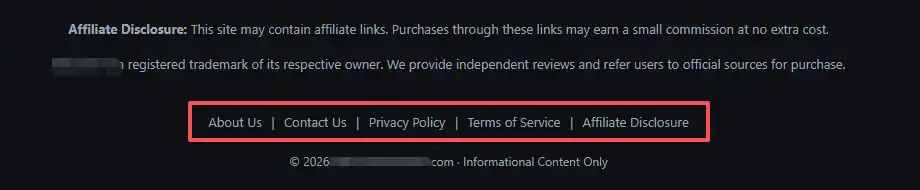
(1) The landing page includes separate pages for About Us, Contact Us, Privacy Policy, Terms of Service, and Affiliate Disclosure. I also placed the Affiliate Disclosure in a prominent spot at the bottom of the page to clearly show my relationship with the promoted product and avoid any confusion about identity or fulfillment. This is a cautious approach. Based on my research, the minimum page requirements for a Google Ads affiliate site are actually just the Privacy Policy and the Affiliate Disclosure. The About Us and Contact Us sections can be combined into the landing page itself as separate sections.
(2) I used an email address with the same domain suffix as my landing page, instead of relying on free services like Gmail. You can check out my previous article where I shared my SOP for testing affiliate offers from scratch. In that post, I explained how I set up a domain-based email step by step.
(3) I set up my real contact address and phone number, ensuring they match the country and region of my payment information.
Google’s ad review process is not just about content; it’s also about verifying identity and trustworthiness. This factor has been one of the most reliable compliance signals in my current experiments.
6.Use an Intermediary Page for CTA Links to Stay Away from Bridge Page Flags
In this experiment, the CTA on my landing page didn’t link directly to the affiliate offer. Instead, it links to a folder under the same domain, where an index.html page handles the redirect to the affiliate link. The purpose of this setup is to make sure the domain users land on after clicking the ad matches the landing page domain, reducing potential review risks.
The code for the CTA on the landing page is as follows
<a href="/offer-name/" class="btn" target="_blank" rel="sponsored noopener">Explore the Product</a>The code for the intermediary page is as follows
<div class="loading-container">
    <div class="spinner"></div>
    <h1>Securely Redirecting...</h1>
    <p>We are taking you to the official store.</p>
    <p class="footer-note" style="margin-top: 30px; font-size: 12px; opacity: 0.5;">
        If you are not redirected within 3 seconds,
        <a href="https://your-affiliate-tracking-link.com/click?pid=XXX&sid=XXX" rel="sponsored">click here</a>.
    </p>
</div>
This approach may reduce the risk of exposing the affiliate link directly and could be safer for compliance. I can’t say with 100% certainty whether this method is absolutely necessary or if it guarantees higher approval rates, but in my experiment, the account remained stable and was not rejected because of this setup.
7.Landing Page Loading Speed and Mobile Optimization
I can’t say with 100% certainty whether page loading speed is a core decisive factor, but logically, it’s definitely one of the important metrics Google Ads review uses.
If my landing page often fails to load, takes too long, or displays incorrectly on mobile devices, I don’t think Google Ads would approve it.
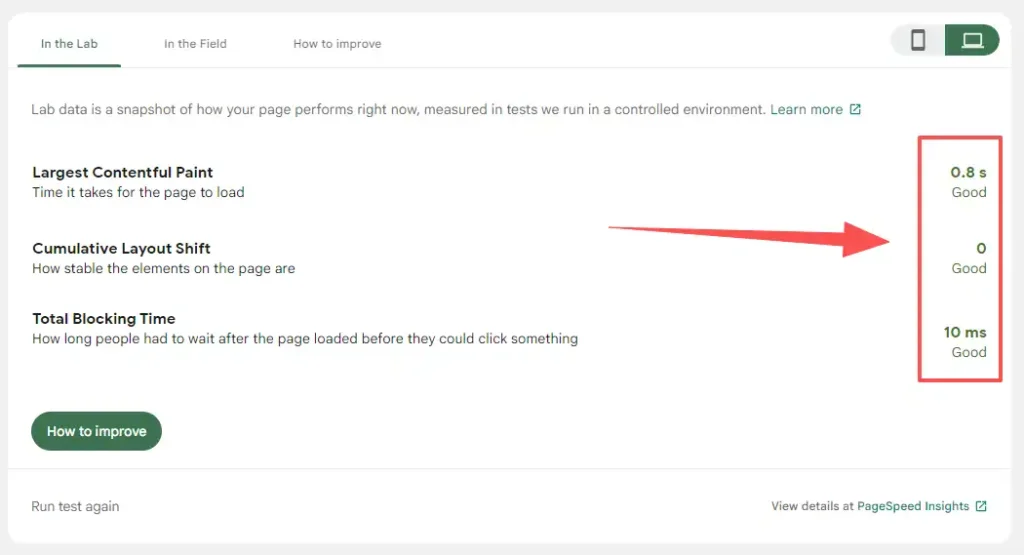
To address this, I tested my landing page using PageSpeed insights to check load times. I also checked the page on different devices and screen resolutions, both mobile and desktop, to make sure the layout didn’t break or appear distorted.
8.The Final URL in Your Ad Cannot Auto Redirect
This was a major pitfall I ran into, and I can confirm 100% that it affects ad review.
I tried using third-party tracker links, and even the original tracking links provided by the affiliate network. The result was instant rejection every time.
Later, I realized that Google Ads has very strict requirements for the Final URL. It cannot be an auto-redirect link, cannot have multiple redirect chains, and cannot perform an immediate 301 or 302 redirect.
So in this experiment, the Final URL in my ad was simply the default domain of my landing page. There were no auto-redirects and no tracker intermediaries.
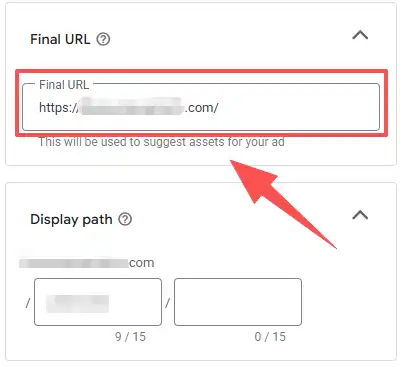
After submitting the ad for review, it was approved in less than 30 minutes.
9.Don’t Set a High Budget for New Campaigns
This is my assumption, but I think it follows the same principle as nurturing a social media account. You need to build the account first, and once it’s stable, you can scale. My logic is that if Google Ads hasn’t fully trusted you yet, suddenly ramping up spend to make money looks like a risky move from the platform’s perspective.
I don’t know for sure if a trust score mechanism actually exists, but in my experiment, running a low-budget campaign kept things stable. For my new campaigns, I set a daily budget of $5 at the start, mainly to test account stability. Once the campaigns ran for 14 days, I planned to gradually increase the budget.
10.Avoid Changing Settings Early in a New Campaign
This is also my assumption, but I noticed that whenever I made adjustments to a campaign, the system would indicate it’s “learning again,” which I assume triggers a re-review. So my approach during the initial 14-day warm-up period was to set the daily budget, bidding strategy, keywords, and ad titles upfront, and then not make any changes for the full 14 days, regardless of how the data fluctuated.
My goal was to show the system a “stable, low-risk, and smooth account behavior” trajectory.
I can’t confirm whether this is a core factor, but at least during my experiment, the account remained stable with no re-reviews or risk notifications.
Google Ads Affiliate Landing Page Approval FAQs
Yes, you can, but it’s not as simple as dropping your affiliate link into an ad. From my experiments, the safest approach is to use your own landing page that adds real value and clearly discloses the affiliate relationship. This way, your page is more likely to be approved, and your Google Ads account stays safe. Avoid “thin content” pages or direct linking to affiliate offers. those are the fastest ways to get disapproved.
Current Status & Next Steps
As of the day I’m publishing this article, the 14-day account survival test is still ongoing. So far, the account remains active and the ad campaigns are running normally.
To avoid interfering with the results, I’m not disclosing the URL of my landing page at this stage. I will continue monitoring the test, and once it’s completed, I’ll update this article and share the landing page URL.
UPDATE (Feb 11, 2026)
The experiment is now complete. The account successfully passed the 14-day survival test without suspension. I have paused the ads and am now revealing the landing page below.
Landing page -> https://titaniumboardinfo.com/ This domain was specifically chosen/registered for this compliance test.
You can also follow my real-time updates on X or check the threads where I’m sharing progress on BlackHatWorld.