
Last Updated on April 30, 2026 by Mr.Feng
This article is part of Experiment #001. Before I could even run my first ad, I had to solve a more basic problem: which offer should I test first? My AM sent me a long list, and I had no framework to choose. This is the scoring system I built to make that decision as objective as possible. It’s the tool I used before Iteration 1 and Iteration 2.
[👉 See the full experiment context here: Experiment #001]
I’ve always had a bit of decision paralysis, so when my AM at ClickDealer sent me a big list of recommended offers, I honestly had no idea where to start. My budget isn’t unlimited, and there’s no way I can test every offer or even most of them. So, following the Minimum Viable Product idea, I need to pick one offer that’s the most suitable to test first.
Why I Decided to Create a Free Affiliate Offer Scoring Tool Online
From my own experience, I don’t have any “expert” theories or a proven method to rely on. Picking an offer to test feels like opening a mystery box. After thinking about it for a while, I made up my mind. I need a set of rules that I can quantify, something that helps me filter offers objectively. That’s why I decided to build a free affiliate offer scoring tool that I could access online anytime.
Before choosing which affiliate offers to promote or test, I use my scoring tool to evaluate each one.
The Offer Candidate List
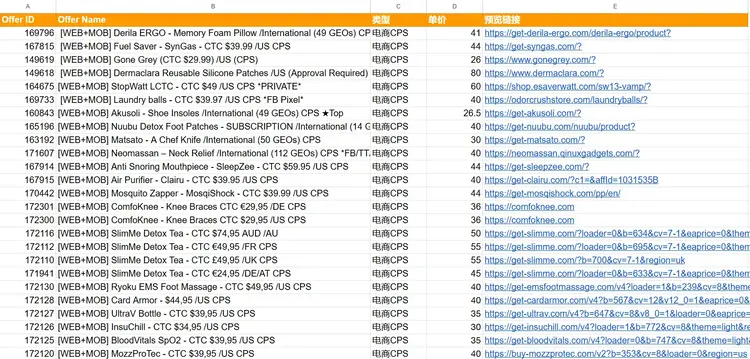
The full offer list from my ClickDealer AM is a bit too long to list here in its entirety. If you’re curious about the raw data, you can check out the complete spreadsheet here.
The 4 Core Factors of My Scoring Logic
After thinking it through multiple times, I decided that if I’m going to create a scoring system to quickly filter offers worth testing, I need to look at 4 main factors.
1.Payout
The most important one is payout. Since I’m planning to test with Google Ads search campaigns, and these ecom offers usually target the US, most keywords now have extremely high CPCs. If I want to find a profitable method through testing, the payout needs to be high enough to potentially cover the costs. A higher payout is the first thing I look at.
Not all high paying affiliate offers are worth testing, so we still need to consider other factors.
2.Keywords
To figure out whether an offer has search demand, I start with keyword research. When I evaluate an offer, I’ll look into the product, list out the brand name and the main product name, and then run both of those keywords through Google Keyword Planner. This helps me determine whether there’s an actual market for the product.
3.Trends
I’ve noticed that some keywords used to have strong search volume but now barely get any searches. So when picking this factor, I decided to look at the trend for the past three months. If the search volume is going up, it’s definitely better.
4.Avg. Top of Page Bid
Originally, I wanted to use CPC as one of the factors, but after researching keywords in Google Keyword Planner, I decided to use Avg. Top of Page Bid instead (the average of the low and high top-of-page bid ranges).
Compared to CPC, I believe Avg. Top of Page Bid does a better job of reflecting what advertisers are actually willing to pay to secure meaningful visibility at the top of the page. For markets like the United States, these bids are often quite high. That’s why finding keywords with relatively lower bid levels can be a strong positive signal, making Avg. Top of Page Bid an important factor in my scoring system.
Although I summarized four factors above, there are actually five in total. I split keywords into brand keywords and product keywords, and treat them as two separate scoring criteria.
At this early stage, I believe designing the scoring tool around these five factors is more than sufficient for my testing needs. I can always refine and optimize the system later as I gather more data from real campaigns.
Set Corresponding Scores for Core Factors
Once I decided on the factors I want to use to filter offers, the next step was to create a scoring logic that’s quantifiable and repeatable for each of those factors.
My goal is simple: no matter what affiliate ecom offer I test in the future, I should be able to plug it directly into this scoring system.
So when I designed the criteria for each dimension, I didn’t base it only on the offers I’m considering this time. I looked at what’s common across most ecom affiliate networks so this system can be more universal.
I summarized the scoring logic in the table below.
Factor : Payout | ||
Payout Range | Weight / Score | Rationale |
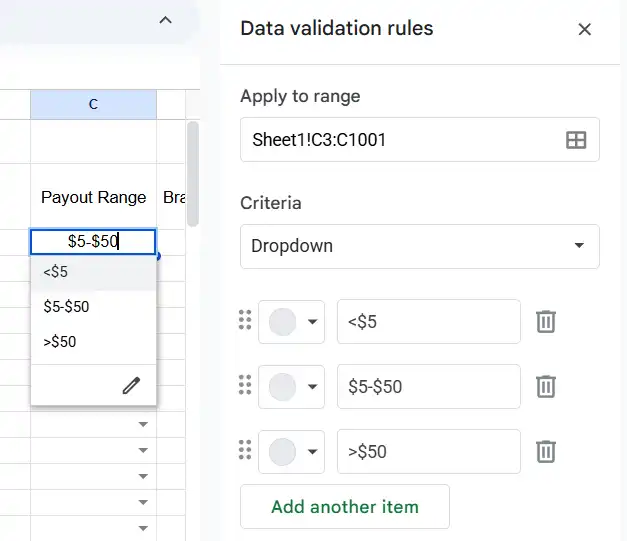
<$5 | +1 | A payout below $5 is simply too low for Google search ads, especially since I mainly target Tier-1 countries where keyword CPCs are already high. |
$5-$50 | +2 | This range can cover a portion of testing costs. User decision cycles are relatively short, and the difficulty of conversion is moderate. |
>$50 | +3 | High payout offers. Even with lower traffic volume, a single conversion can generate strong profits and support higher keyword bids. |
Factor : Brand Keywords | ||
Monthly Search Volume | Weight / Score | Rationale |
0-10 | 0 | With this level of search volume, almost no one is aware of the brand. In this case, you can only hope that brand interest grows over time. |
10-1K | +1 | An early-stage market. Competition is low, but traffic potential is limited, making it hard to scale meaningful revenue. |
1K-10K | +2 | At this level, users are already fairly familiar with the brand. Demand is strong enough to support profitability. |
10K-1M | +3 | A well-known product. My only concern here is higher competition, but once i gain rankings or ad visibility, traffic potential can be explosive. |
Factor : Product Keywords | ||
Monthly Search Volume | Weight / Score | Rationale |
0-10 | 0 | This suggests the product category is extremely niche. If brand keyword volume is also low, I generally consider the offer unsuitable for keyword-based ads. |
10-1K | +1 | The category is still too niche, making it difficult to reach a clearly defined audience. |
1K-10K | +2 | Stable demand. This works well as a supplemental traffic source alongside brand keywords. |
10K-1M | +3 | A strong, mass-market category. These keywords allow me to reach a large pool of potential new customers. |
Factor : Trends | ||
Trend Direction | Weight / Score | Rationale |
Decreasing | +1 | Demand is shrinking. The product may be seasonal or past its peak, which usually makes conversions harder during testing. |
Stable | +2 | Demand is steady. This is suitable for longer-term testing and ongoing campaigns, with relatively predictable performance. |
Increasing | +3 | The product is gaining momentum. For testing purposes, it’s easier to capture upside from growing demand, and conversion rates often improve as interest rises. |
Factor : Avg. Top of Page Bid | ||
Avg. Top of Page Bid Range | Weight / Score | Rationale |
<$0.5 | +3 | Traffic is very cheap, testing costs are low, and profitability is much easier to achieve. |
$0.5-$1 | +2 | Around the industry average. With a strong payout, this level can still be very profitable. |
>$1 | +1 | Based on my keyword research, most U.S.-targeted keywords tend to fall above $1, making this a common but more competitive range. |
Based on the scoring framework I’ve designed so far, the tool tops out at 15 points.
Building My Free Affiliate Offer Scoring Tool Online (Google Sheets)
To turn the scoring logic I designed earlier into a tool I could actually use, the first solution that came to mind was Google Sheets.
I’m not a coder, so I needed something flexible, lightweight, and easy to update. Google Sheets was the perfect way to build this online scoring tool for free. Instead of writing complex code, I could simply build formulas and access the tool from any device while testing different offers.
Setting Up My Offer Scoring Tool
Based on the scoring framework I defined earlier, I created separate columns for five factors: payout range, monthly search volume, trend direction, and Avg. Top of Page Bid.
At the same time, since each offer has different brand keywords and product keywords, I added separate columns for these two fields as well. After doing the research, I can fill in the selected brand and product keywords, which makes them easier to track and remember later. In addition, I included columns for the offer campaign ID and the offer campaign name.

Next, based on the conditions I defined for the 5 factors, I added data validation rules in Google Sheets.
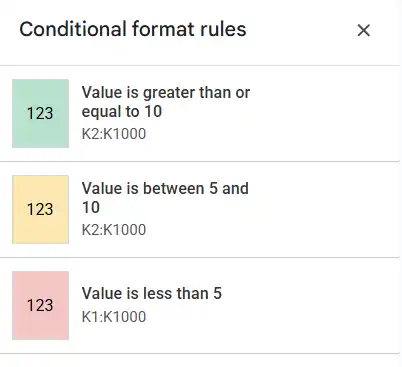
I then added a final column called Total Score, applied the scoring formula, and used color coding to visually separate low, medium, and high scores.
At this point, I had successfully turned the scoring logic into a practical, usable tool, a simple and efficient way to screen offers. Using this sheet, I can quickly identify higher-quality offers to test in my Google Ads campaigns.
[Click here for the Affiliate Offer Scoring Tool template.]
How Do I Use This Scoring Tool to Filter Offers?
First, I added all the offer names and offer IDs from my previous The Offer Candidate List into my spreadsheet.
Then I started preparing to research each offer one by one using Google Keyword Planner, beginning with the first offer.
![A spreadsheet titled "Affiliate Offer Scoring Tool" showing Offer ID 169796 for [WEB+MOB] Derila ERGO Memory Foam Pillow, with columns for Payout Range, Brand Keywords, Monthly Search Volume, and Trend Direction.](https://www.iammrfeng.com/wp-content/uploads/2026/01/affiliate-offer-research-scoring-tool-initiation.webp)
The first offer is Derila ERGO – Memory Foam Pillow / International (49 GEOs) CPS. After reviewing the offer’s website, I identified the brand keyword and product keyword as Derila ERGO and Memory Foam Pillow, respectively.
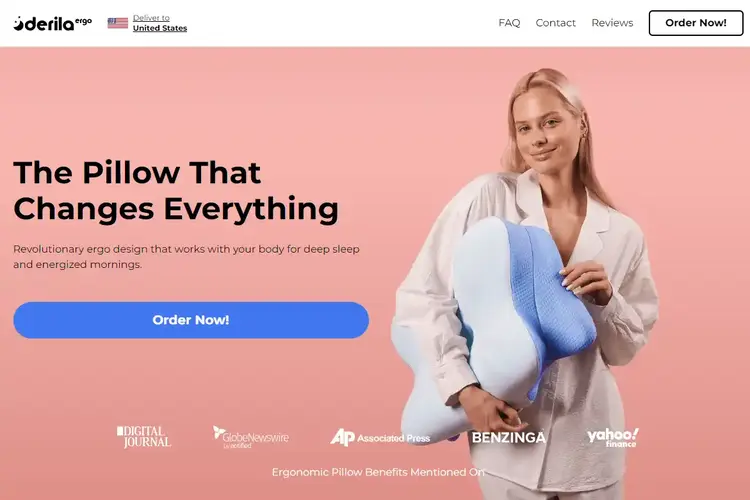
Next, I used Keyword Planner to research the keywords Derila ERGO and Memory Foam Pillow, looking at their Average Top of Page Bid and trends. (For trends, I referred to the “three-month change” metric, since the data from the last three months is more up-to-date and accurate.)
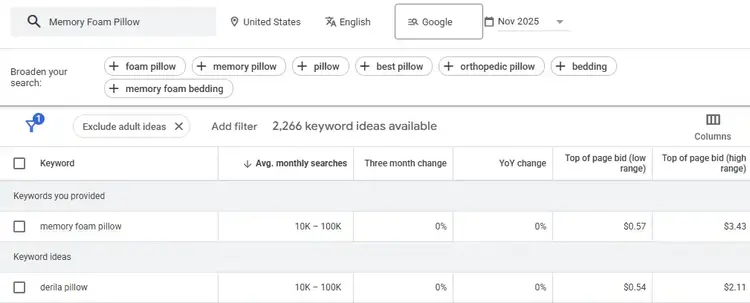
Based on these results, I could fill in the values in my scoring tool. The final score came out to be 11.

Using this approach, I ran all the offers from The Offer Candidate List through the scoring tool. In the end, two offers came out with the highest scores, both at 11 points.
- [WEB+MOB] Derila ERGO – Memory Foam Pillow / International (49 GEOs) CPS ★Top
- [WEB+MOB] Titanium Cutting Board – KatuChef – CTC $59 / US CPS
Since both offers had the same total score, but this was an initial test and my budget was limited, I could only choose one to move forward with. After comparing the two, I decided to go with the offer that had the higher payout, which was the Titanium Cutting Board offer.
What’s Next?
This tool is meant to test whether Google Ads can convert affiliate offers on a single-page site. The scoring tool I use to quickly screen offers is based on my own understanding, design, and implementation. However, that doesn’t mean an offer selected using this method will automatically perform well in Google keyword ads.
I still need to run further tests and continue refining and optimizing the scoring tool.